
For iPhone · Built on Apple Screen Time
Your apps stay locked until you walk.
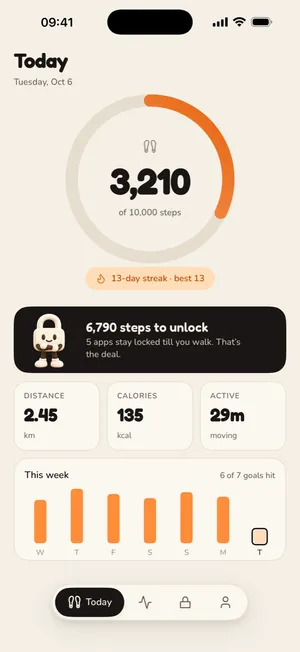
StepGate locks Instagram, TikTok and anything else you pick until you hit your daily steps. Walk, and they're yours for the rest of the day.
- Steps from Apple Health
- Works with Apple Watch steps
- No account


The lock
Open Instagram. Get sent for a walk.
When you open a locked app, you don't get a guilt trip. You get the distance, said as a walk, and one button.
- A real lock, not a reminder. StepGate uses Apple's Screen Time framework to put a shield over the apps you pick.
- Steps left, in minutes. "A 15-minute walk" lands better than "1,500 steps". StepGate works it out at about 100 steps a minute.
- Hit your goal, everything opens. Every locked app, for the rest of the day. No timers to babysit.
How it works
Three steps. One promise.
 1
1Pick the apps that eat your day
Choose apps, whole categories or websites in Apple's own Screen Time picker.
 2
2Set a goal you'll actually hit
StepGate suggests one from your last week in Apple Health. Anything from 3,000 to 15,000.
 3
3Walk, then scroll
Hit your steps and every locked app opens for the rest of the day. Promise kept.
Strict enough to work
Kind enough to keep.
A blocker that never bends tends to get deleted. StepGate is built for real weeks: sick days, long flights and the time you just need Maps.

Rest days
Pick the days the lock stays off. Sunday is one by default. A rule you can keep beats a rule you quit.

Lock hours
The lock only runs when you say, 6:00 AM to 9:00 PM by default. Outside those hours your apps are open.

Short pauses
Need Maps for a minute? Pause the lock for 5, 10, 15 or 30 minutes. It comes back on its own.

Steps from Apple Health
Your iPhone counts, and so does your Apple Watch through Apple Health. Read-only, always.

Locks again every morning
Even if you close StepGate, the lock comes back at the start of your lock hours.

Private by design
No account. Apple's picker means StepGate can't even see which apps you lock.
Streaks and trends
Watch the promises pile up.
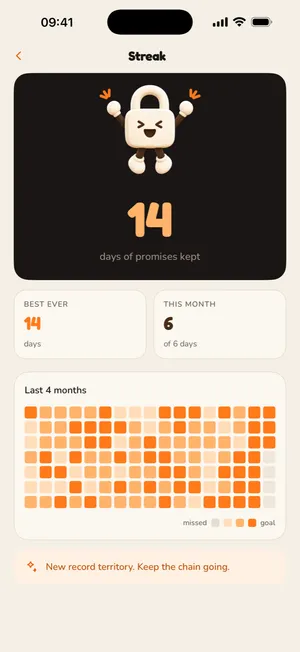
Count the days you walked before you scrolled. See your best streak, four months of days at a glance, and week, month and year trends.
Plus a Home Screen widget and two Lock Screen widgets, so your steps left are always a glance away.
Why a walk
The research, in three numbers.

Try the calculator
What's your screen time in steps?
At about 100 steps a minute, one hour on your phone is about 6,000 steps of walking. Put in your own number.
Open the calculatorGuides
Fewer scrolls, more steps.
 Steps & walkingHow Many Steps a Day Do You Really Need?
 Screen timeHow to Stop Doomscrolling: 9 Fixes That Actually WorkScreen timeWalk to Unlock Apps: How Step-Gated App Blockers Work
 iPhone how-tosHow to Limit Instagram on iPhone (3 Ways That Work)Screen timeHow to Reduce Screen Time on iPhone: A 14-Day Plan
 HabitsWhy Earning Your Screen Time Works Better Than Banning It
What does StepGate do?
StepGate is an iPhone app that locks the apps you choose until you reach your daily step goal. Once you hit the goal, every locked app opens for the rest of the day. It uses Apple Screen Time to do the locking and reads your steps from Apple Health and your iPhone.
What happens when I open a locked app?
You see a lock screen that says the app is locked and how far you have left, written as a walk ("A 15-minute walk and it's yours for the rest of today"). It has one button, Go walk, which closes the app and sends you a notification with your progress.
Which apps can I lock?
Any app, a whole category (like Social or Games), or websites. You pick them in Apple's own Screen Time picker. Change the list whenever you like.
Do steps from my Apple Watch count?
Yes, through Apple Health. StepGate reads the same combined step total the Health app shows, which includes your Apple Watch. There is no separate Apple Watch app.
What if I'm sick, travelling or just need a day off?
Use rest days. On a rest day the lock is off and no steps are needed. Sunday is a rest day by default and you can pick any days you like. Rest days do count against your streak if you walk less than your goal.
Does StepGate cost money?
StepGate needs a StepGate Plus subscription to lock apps. You'll see the current options in the app before you subscribe. If your subscription ends, your apps unlock: StepGate never keeps them locked.
Walk first. Scroll later.
Make yourself one promise. StepGate holds you to it.
Download on the App StoreiPhone · iOS 17 or later · StepGate Plus subscription required